9. PDF readiness
The "Print readiness" report checks whether a PDF is technically ready for press. It runs deterministic file checks — no AI judgment. Use it before sending artwork to the printer.
This chapter is mainly for print/pre-press and designers.
9.1 Open the report
- Open the proof (a PDF) and select its "AI" tab.
- Select "Print readiness". The empty state reads: "Check print readiness — 14 checks — color mode, bleed, DPI, fonts, ink coverage, overprint, safe zones, and more."
- Select "Run check".
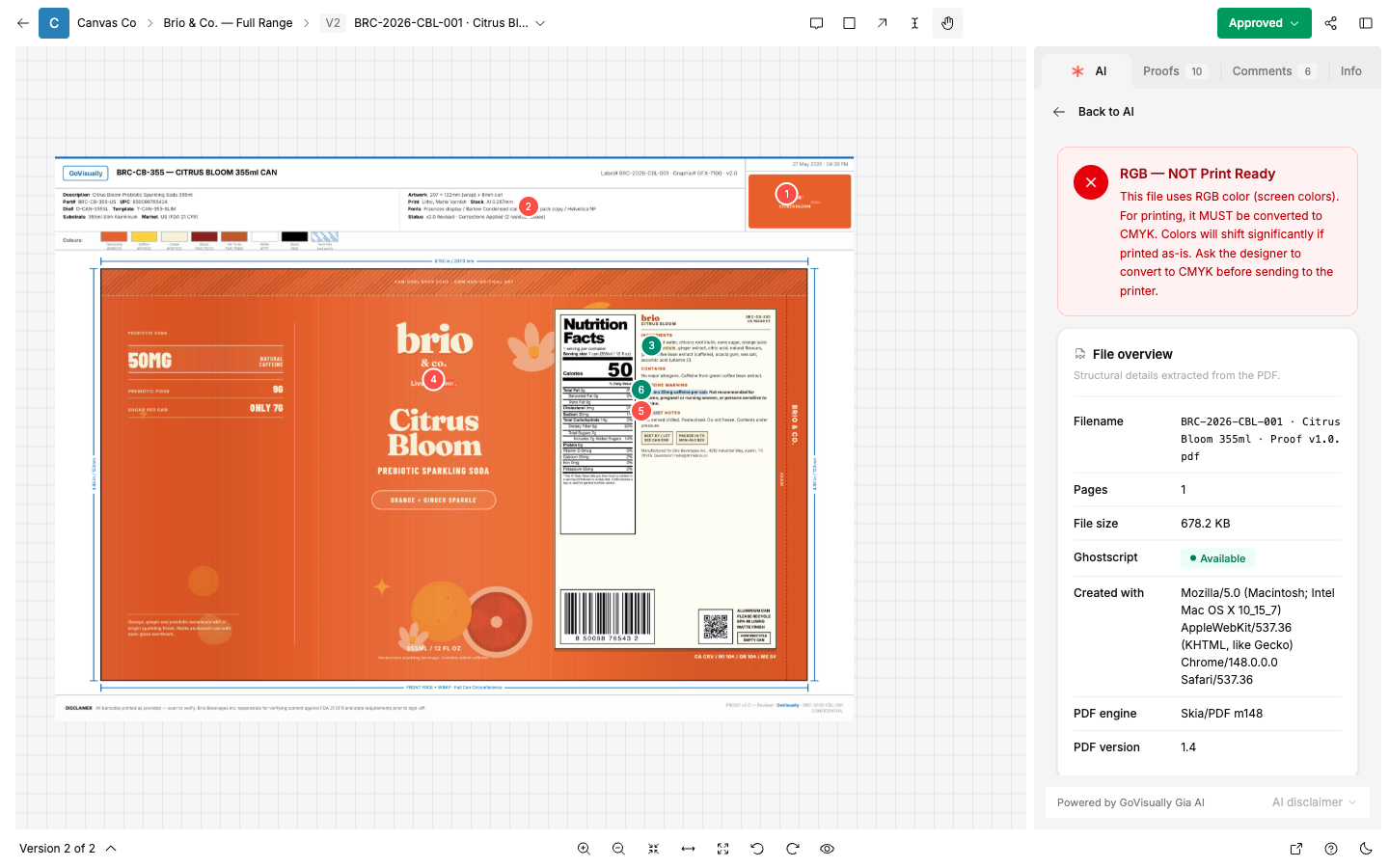
9.2 Read the report
Every check returns one of three states: "pass", "warn", or "fail".
- "pass" — no action needed.
- "warn" — check it. It may be acceptable for your print process.
- "fail" — fix it before printing.
The report sections:
- "File overview" — "Filename", "Pages", "File size", "Created with", "PDF engine", "PDF version".
- "Page overview" — "Bleed" and "DPI" per page.
- "Color spaces" — the report explains: "CMYK — print inks. RGB — screen colors, not for press. Spot — pre-mixed inks. ICC — embedded profile."
- "Sampled colors" — colors sampled from the artwork.
- "Ink separations" — the ink channels in the file, including spot inks.
9.3 The checks
The report screen advertises "14 checks"; the table below lists every named check we have verified in the underlying engine.
| Check | What it verifies | Default expectation |
|---|---|---|
| Color Mode | The file uses print inks, not screen colors. | CMYK or spot. RGB fails: "RGB — NOT Print Ready". Mixed modes need review. |
| Bleed | Artwork extends past the trim edge. | 3 mm (5 mm for corrugated). |
| Image Resolution | Placed images are sharp enough for print. | Minimum 300 DPI. 350 recommended. Flexo: 150. |
| Spot Colors | Spot inks (for example Pantone) are defined correctly. | Named spot swatches. |
| Technical Layers | Dielines, cut, crease, and perforation layers are set as non-printing. | Recognized structural layers. |
| Fonts | All fonts are embedded or subset. | No missing fonts. |
| Ink Coverage | Total ink (TAC) is within press limits. | Maximum 320% (corrugated 240/220). |
| PDF Standard | The file declares a print standard. | PDF/X. |
| Overprint | Overprint settings will not cause missing elements. | No risky overprints. |
| Safe Zone | Text and important content stay inside the safe margin. | 5 mm (corrugated 10 mm). |
| Hairlines | No lines too thin to print. | No hairlines. |
| ICC Profile | A color profile / output intent is embedded. | Profile present. |
| Annotations | No leftover comments or markup objects in the file. | None. |
| PDF Health | The file structure is valid. | No corruption. |
| Vector/Raster | Expected elements are vector, not flattened raster. | Vector text and lines. |
Note: ink coverage and ink separation analysis depend on server tooling. The "File overview" shows their availability ("Available" / "Not installed"). If they show as unavailable, those rows will be empty — contact support.
9.4 A pre-press workflow
- When a proof is finalized (chapter 4), open "Print readiness" on the final version.
- Resolve every "fail". Common fixes: convert RGB images to CMYK, add bleed, embed fonts, reduce TAC.
- Judge each "warn" against your printer's specification sheet. A warning is not always a problem.
- Upload the corrected file as a new version, and run the report again.
- Keep the passing report with the finalized proof as your handoff record to the printer.